Wednesday, April 23, 2014

Using Kickstarter To Kick Start Innovation (Innovation series part 1)

This year I taught a unit called Technology & Innovation. One of the three essential questions for this unit is, "What triggers innovation?" There are a few ways I thought that one could teach this question:

1) The first is to study famous innovators and their motivations.

2) The second might be to create theoretical innovations on existing things. After all, every innovation is essentially a remix:


3) We could try to make something new.

4) We could design an online "Innovation Station" (like the one featured on the "The General"episode of Techlandia), create Innovation projects and challenge others to try the projects out.

5) Instead of virtually setting up an Innovation Station, we could physically set up a Makerspace and see what others could come up with.

I really like ideas 3 through 5. Because this is my first year with this unit though, I decided tackling idea 3 was enough. I hope to implement ideas 4 and 5 next year.

To get kids thinking about making something new, I turned to Kickstarter for the format and exemplars.

I liked this grouping a lot, and made some minor changes to fit with my kids. The first is that I deleted "Film & Video." We do a lot of film and video in class already, and I didn't want this to be redundant.

I also changed "Theatre" to "Performance Art." This would give my kids more freedom with performing if I could expand a theatre to include anywhere.

I changed "Games" to mean only boardgames and tabletop games. We do a lot of Scratch already, and again I didn't want this to be redundant.

Finally I removed "Technology" because we would create something new using Makey Makeys and Scratch later.

The next thing I did was to look for exemplars for each of these categories that I felt could inspire 9 and 10 year olds. The only category I did not find was "food." So instead we talked about what could be possible.

Here are the exemplars I found. I shared them a category at a time, and after each category had the kids brainstorm ideas of their own. In the next post I'll share what my students created.


ART


PERFORMANCE ART


DANCE & MUSIC


Or any Rube Goldberg Machine


PHOTOGRAPHY


PUBLISHING

Sunday, April 20, 2014

Adopting Boom Writer For Elementary Students

I really like Boom Writer. It's a site that has a huge bank of story starters in a variety of genres. Boom Writer gives you the first chapter of a bunch of different stories. And then it's up to you to write the rest.


What I really don't like about Boom Writer is the following:
1) You have to type the stories.

I think this is a big problem with adapting cool writing tools like Boom Writer and Write About This.
When kids are still learning to write, and just learning to type, they aren't nearly as good at writing when they are typing. That's my personal experience with my students as well as with myself. Some some other opinions that corroborate mine can be found here and here.
This just isn't always conducive to good story writing

So it's important for me to adopt any cool app or online writing tool to paper. I've written how I adapted Write About This before.

2) Everyone is in direct competition with each other. I think gameification sounds really cool. I'd love to implement it full speed ahead. But I have a fundamental problem with extrinsic rewards and public competition in Elementary. I don't see the difference between a Leaderboard and putting up a poster with all the kids names on it to show how many gold stars each has received. At its worst its public humiliation. Boom Writer really only awards the best and doesn't humiliate the non-best, but I've been reading a lot of gamification literature lately and it's on my mind.


But the source material of Boom Writer is awesome. More than anything I think it gives the students the opportunity to learn what it takes to complete a real story. So we write our chapters on paper. The students choose their genre, get the first chapter and review the rubric for the chapter. But the rubrics I make only focus on one thing: answering the questions that are formed in the first chapter. They have three chapters to do this, and it's not easy. We talk about the pitfalls of answering the questions too soon or too quick, and brainstorm ways to do it creatively.

I won't list the first chapters here because Boom Writer would probably not appreciate that too much. But here are the titles, a quick summary from the website, and the rubrics I made for each one. To access the first chapters, just register with Boom Writer.

Gone! by Nancy Viau
Genre: Science Fiction, Mystery
Summary: Dorie and her older sister Meg love to surf. Catching that "perfect wave" is a rush and Dorie is desperate to get out and ride a few. But with the appearance of a mysterious green light on the water, Dorie's world gets turned upside-down.


Hunted by Ella Kennen
Genre: Myths and Monsters
Summary: Elliot is like a human lie detector, which comes in handy when potential pop quizzes might be assigned. He's never been wrong yet, and that's just one of the things that make Elliot an interesting  foster brother. Elliot has another special skill and now he's being hunted. 


Monsters Need Heroes Too by Mike Grinti
Genre: Fantasy
Summary: Corin can't wait to be summoned to a magical world where he can be a real hero and save a kingdom. Then his best friend Julie is summoned away right in front of him! Luckily for Corn, he gets summoned, too. Unluckily for him, he seems to have been summoned to fight for the bad guys... a group of trolls!


Mr. L's House by Helen Kampion
Genre: Suspense/Thriller
Summary: Just before dawn, Eva is woken by a strange noise and discovers an eerie light around Mr. L's house. She's never spoken to Mr. L, but rumor has it that he can supposedly read minds and predict the future. Eva's twin sister Lacey doesn't see or hear anything, so Eva decides to investigate herself. What she finds however is the last thing she expected.


PowerKid by Greg R. Fishbone
Genre: Action/Adventure
Summary: Terry believes that his father is the masked superhero, PowerGuy. It's the only explanation for his absence, his mother's reluctance to talk about superheroes, and the way his mother moves  them around so frequently from town to town. Terry aspires to be a superhero as well, but will things go the way he plans?


The Great Treasure Hunt by Ashleigh West
Genre: Action/Adventure, Mystery
Summary: It's been a lazy summer for Keith and his best friend Jake until, through a clumsy accident, they make a discovery which could turn out to be the greatest adventure of the summer!


The Shell Game by Diane Bailey
Genre: Mystery
Summary: It's easy to spot a tourist in the city. New Yorker Abby knows the shell man's game and knows only a tourist could be conned by the act. She warns the foolish tourists, but before the shell man can finish his trick, the police pull up and suddenly the street is empty. That is except for one of the shell man's bags, and what Abby finds inside is more than she could have imagined. 


World's Greatest by Johnny Riley
Genre: Humor
Summary: Kenny Jenkins set the Guiness World Record for crab walking at one-point-seven-three miles. Everyone else just rounded it to two miles and treated Kenny like some sort of superhero, but Tommy wasn't buying it. Tommy was sick of all the hype about Kenny and his stupid crab walking skills, and is determined to become the World's Greatest at... something.


Friday, April 18, 2014

A Comment Rubric For Elementary Students

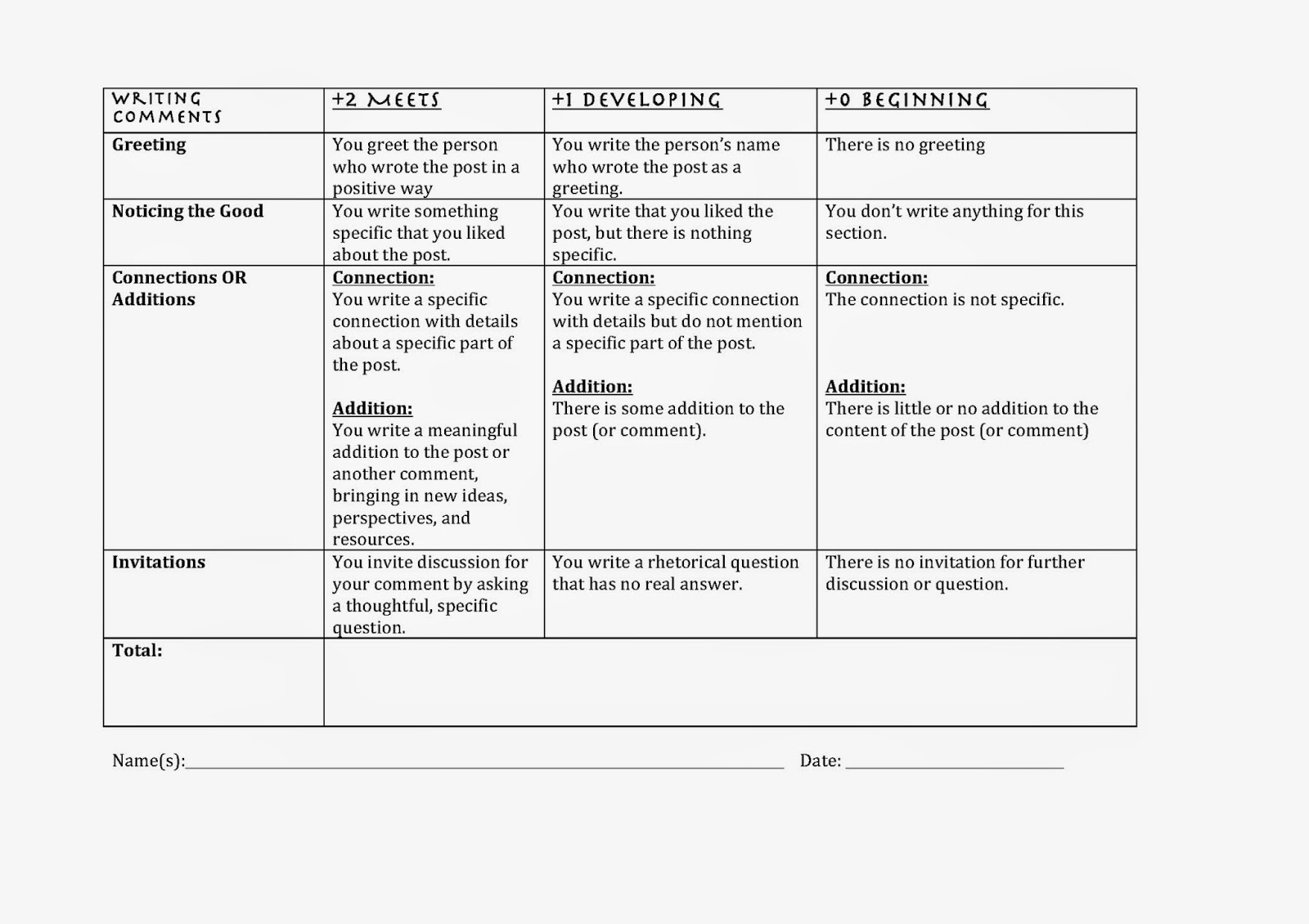
It's not as easy to find a comments rubric on the Internets that can be taught and used in conjunction with a blogging rubric. Langwitches has a commenting rubric that is thorough when assessing content, but like with other blog rubrics, misses the collaboration aspect of blogs and comments.

Here's a comments rubric that my 4th grade students use to assess each other. The focus of this rubric is collaboration to be used in conjunction with blog posts.

Our 4th Grade Comments Rubric:

Wednesday, April 16, 2014

A Blog Rubric For Elementary Students

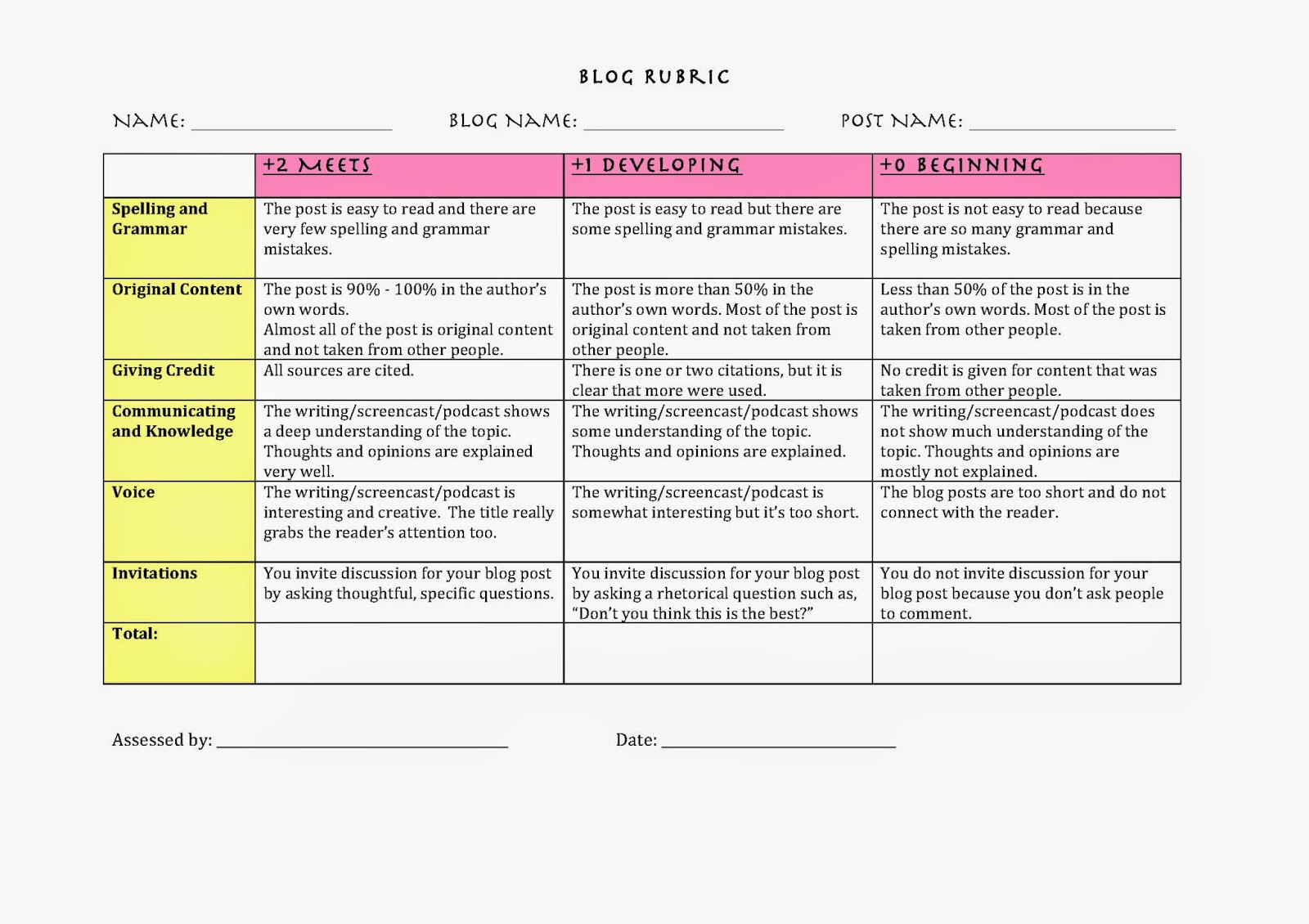
There's no shortage of blog rubrics on the Internets. But they're either too long or not written in elementary-student-friendly language or they don't assess an important aspect of blogging. Actually that just applies to just the one, but that one has made its rounds on several teaching sites.

So here's a less complicated version that my 4th grade students use to assess each other.
Besides scaling it down, I also wanted to include a section that deals with a big reason why we should blog: Collaboration.

Our 4th Grade Blog Rubric:


Saturday, February 22, 2014

6 Great Music Creation Tools For Teachers and Students

There's been a dropoff in my posts over the past few months. This isn't because I have run out of things to talk about. I've just been trying to adjust to a new school and curriculum. I'll be regularly posting again soon.

In the meantime, I wanted to talk about music creation platforms. I love them. So here are my favorites in order of complexity, starting with the easiest to use:


1) Toca Band (An iOS App)

The simplest app I've messed around with also has a lot of staying power.  Like with all of the apps made by Toca, Toca Band is a lot of fun and very easy to use.

2) Incredibox

Incredibox is very much like Toca Band but with a few added features. First when you add a new beatbox singer, it will wait until the right time to join in, so it sounds better as you swap singers in and out. There is a random mode that randomly puts in new singers as the song progresses. There are "bonus" interludes that are interesting even if they don't quite fit the song. But the main advantage is that there are now three versions. Below are videos that feature each of the versions:

Incredibox Version 1


Incredibox Version 2

Incredibox Version 3


3) Button Base
Potentially one of the most annoying applications in this list, Button Base still is a lot of fun. There are a lot more choices and styles in this program. You activate a new beat by clicking on a cube. But not all of the cubes fit seemlessly together. There is more experimentation here, but as long as you're working towards creating a piece of music and not just randomly mashing cubes, you can create something pretty cool:


4) Garage Band

I can't overstate Garage Band enough... I think it should be taught to all elementary students. It's power and easy learning curve lets anyone who doesn't know anything about music theory but likes music to make their own original pieces. Having all of the expansion packs helps, as there are literally thousands of loops from all over the world to choose from. Here's a song I made last year:


My brother made a song with our nephew a few years ago. Neither of them had much experience with the app before this:


5) Isle of Tune

Isle of Tune is next on my list, and besides Garage Band, its the one I've used in school the most. The ability to draw a map that makes music is so weird and intriguing, even if you have no idea how to create a beat, it instantly draws you in.
It's hard to create a good song though. Much harder than Garage Band. However it seems to have almost as much draw because of the visual aspect.

I spend a few minutes on Beat Lab from time to time. There are lots of genres and options. It's a bit hard for me though. However looking at Beat Lab's extensive examples, it seems like it can be extremely powerful. 

7) UJam
I've talked about UJam before here and here. I've mostly used it to transform voice into instruments, as with the music in this commercial jingle. I took Lukas' voice and changed it into a toy piano. That's awesome!


What else is there?


I've played with several others but none have really stuck. Ophion is very well designed and kind of fun for a few minutes.


SoundyThingie has even more of a unique design, but can become extremely annoying really quickly.

Both are worth playing with if your creative bug is itching your inner ear.

What do you use? I would love to hear additional recommendations.


Related Posts Plugin for WordPress, Blogger...